TASCO: Task-Specific Context Optimization for Training-free Robot Planning
Anonymous Authors
Under review · ICLR 2027
TL;DR
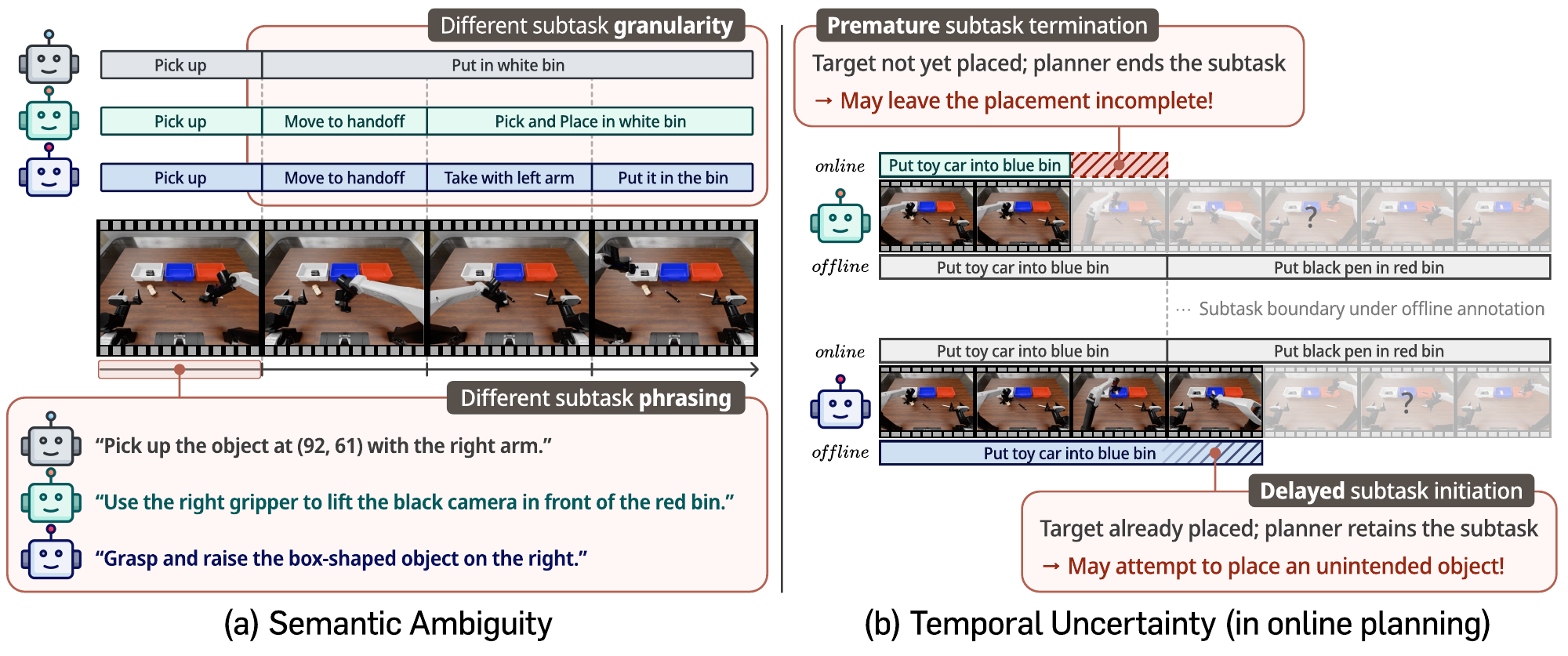
Offline subtask annotations and causal online planning can disagree, weakening long-horizon robot execution. TASCO induces task-specific context from a reference demonstration, then refines it so online predictions agree more closely with the fixed annotations. With Gemini 3.7 Flash and π₀.₅, RMBench success rises from 29.6% for Baseline to 51.8% for Refined-TASCO.
Why subtask consistency matters
Method
TASCO uses two stages to make offline annotations consistent and align causal online predictions with them.
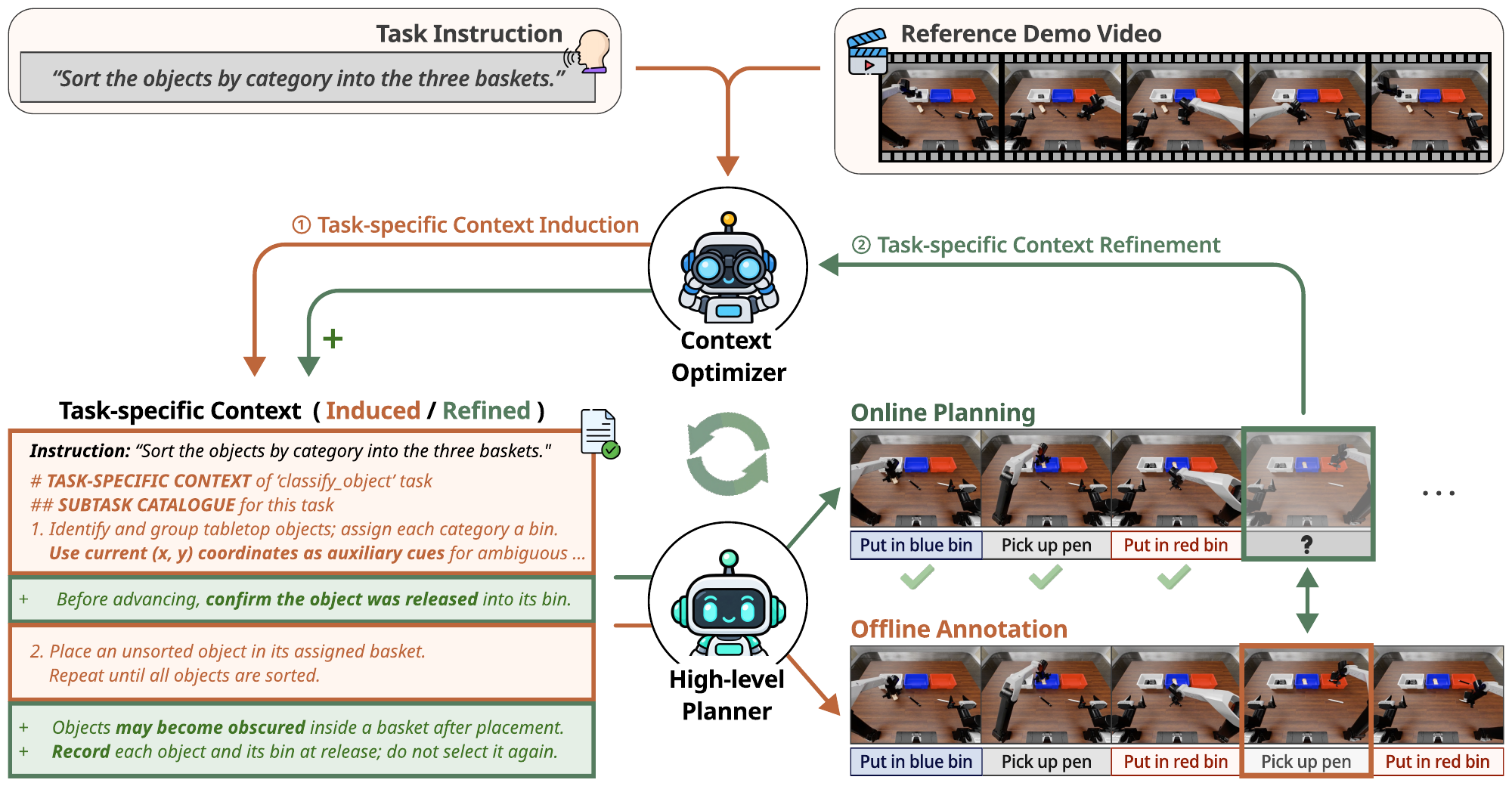
A frozen context optimizer induces context from a reference demonstration and refines it against causal predictions. The frozen planner uses the context for annotation and deployment; induced annotations train the low-level policy.
1. Context induction
From the task instruction and one reference demonstration, the context optimizer defines canonical subtask labels and transition criteria. The planner uses this context to annotate full training demonstrations; those annotations train the low-level policy.
2. Context refinement
The planner replays training demonstrations with only observations available at each step. The optimizer compares causal predictions with fixed offline annotations and proposes context changes. A change is kept only if mean subtask agreement improves.
Results
Refinement improves upon induction in each evaluated simulation setting and on the real robot. Baseline uses the same high-level planner with a human-labeled subtask set; No-HLP is a flat policy without a high-level planner and is not plotted here.
RMBench
Mean success rate (%)
Planner
Policy
Baseline (HLP)
TASCO
Refined-TASCO
Gemini 3.7 Flash
π₀.₅
29.6
44.2
51.8
RLDX-1
38.4
48.2
53.1
GPT-5.6 Luna
π₀.₅
17.3
37.8
40.9
RLDX-1
12.0
23.6
29.8
RoboDojo Long-Horizon
Evaluated five-task subset excludes tasks with zero flat-policy success because of insufficient low-level execution precision.
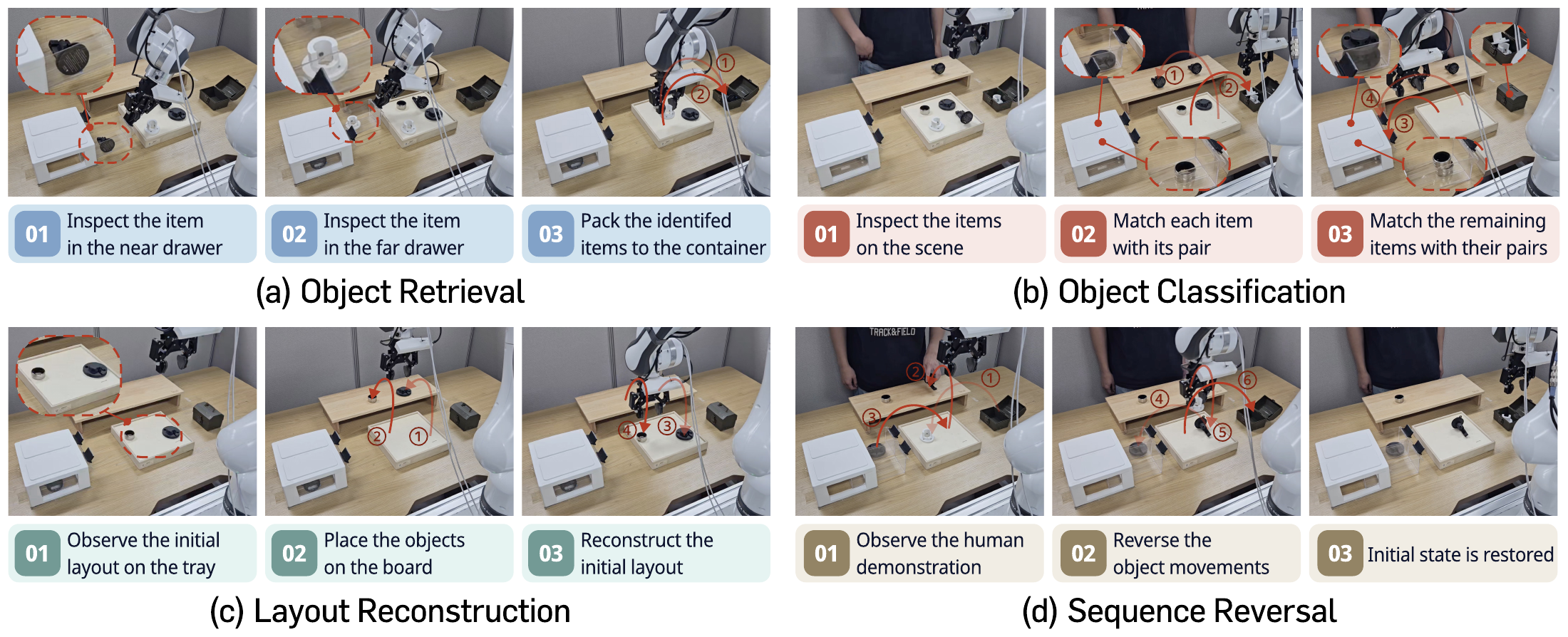
Four real-robot tasks require the planner to use earlier observations when selecting later subtasks.
Task-specific partial-credit score (%)
Task
Baseline (HLP)
TASCO
Refined-TASCO
Object Retrieval
25.0
58.3
91.7
Object Classification
12.5
33.3
58.3
Layout Reconstruction
43.8
45.8
77.0
Sequence Reversal
13.9
47.2
75.0
Average
23.8
46.2
75.5
API-planner results from Tables 1–2. RMBench reports success rate (%) over 50 trials per task; RoboDojo reports its benchmark-defined partial-credit score over 50 trials per task. Real-robot results are task-specific partial-credit scores (%) over 12 trials per task.
Real-robot examples
Videos show successful and failed executions for each of the four evaluated tasks.
Object Retrieval
Inspect the near and far drawers, then pack the matching objects into the container.
Successful executionFailed execution
Object Classification
Inspect the objects in the scene and match each one with its corresponding pair.
Successful executionFailed execution
Layout Reconstruction
Observe the initial arrangement on the tray, place the objects on the board, and reconstruct the initial layout.
Successful executionFailed execution
Sequence Reversal
Observe a human demonstration, then reverse the sequence of object movements to restore the initial state.
Successful executionFailed execution
Playback annotations, where present, are embedded in the videos.